
- Сканирование VirusTotal
- VirusTotal
- XenForo версия
- 2.3
Limit Attachment Downloads add-on gives forum admins powerful control over thread post attachment downloads by allowing them to set a variety of limits, such as:
In addition, the add-on can encourage user engagement on the forums and can lead to more account upgrades, boosting your site’s revenue.
 Usergroup Permissions:
Admins can fine-tune who can download attachments and under what conditions.
 Support for Setting Permissions in Each Forum Node:
This gives admins even more granular control over download limits.
 Three Types of Limits:
Admins can choose from customizable download limits, reaction limits, and message count limits.
 Ability to Bypass Limits:
Admins can allow users to bypass limits by setting them to “Unlimited” or by granting the appropriate usergroup permissions.
 Info Tabs Bar:
Provides a quick overview of the user’s current download limits for the viewed post.
 Download Limits Overview Page:
Offers a detailed overview of user-specific download limits for the accessed post.
 User-Friendly Error Pages:
These pages explain and guide users through download limits and restrictions.
 Admin Options:
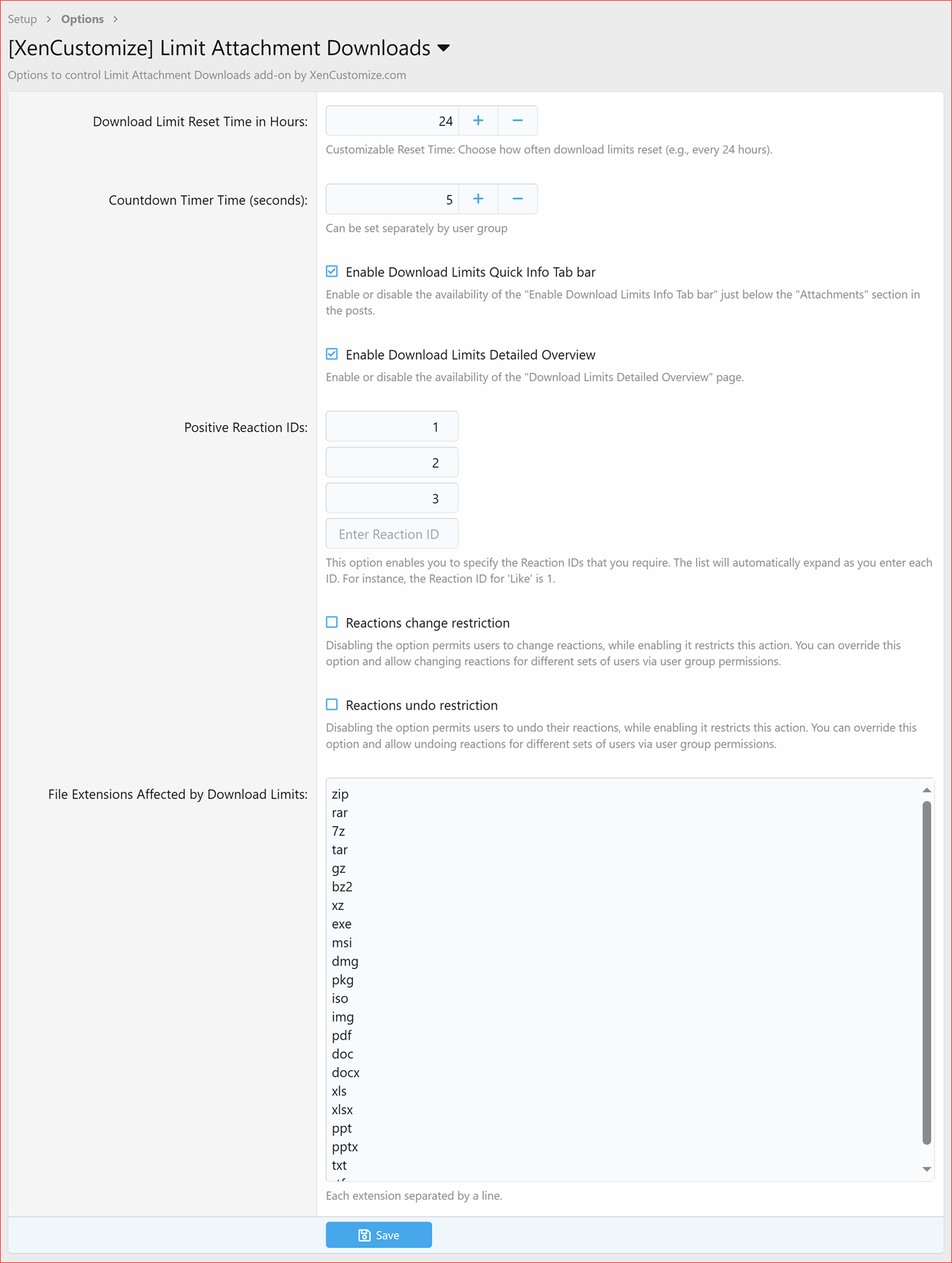
Admins can customize the download limit reset time and enable/disable the Info Tabs Bar and Download Limits Overview Page.
 Easy Customization:
Includes custom classes and dedicated style properties for effortless customization.
 Control Over Reactions:
Restrictions on changing or undoing reactions, controlled by admin options and usergroup permissions.
 File Extensions Affected by Download Limits:
Admins can choose specific file extensions that will have download limits applied.
If you’re looking for a powerful way to control attachment downloads on your XenForo forum, the Limit Attachment Downloads add-on by XenCustomize is a great option. It’s packed with advance features and gives admins the flexibility to fine-tune download limits to meet their specific needs.
Uncertain
If you need a functionality that isn't clearly mentioned above, please don't hesitate to contact us before making a purchase. Once you've bought and downloaded the add-on, your order can't be refunded.
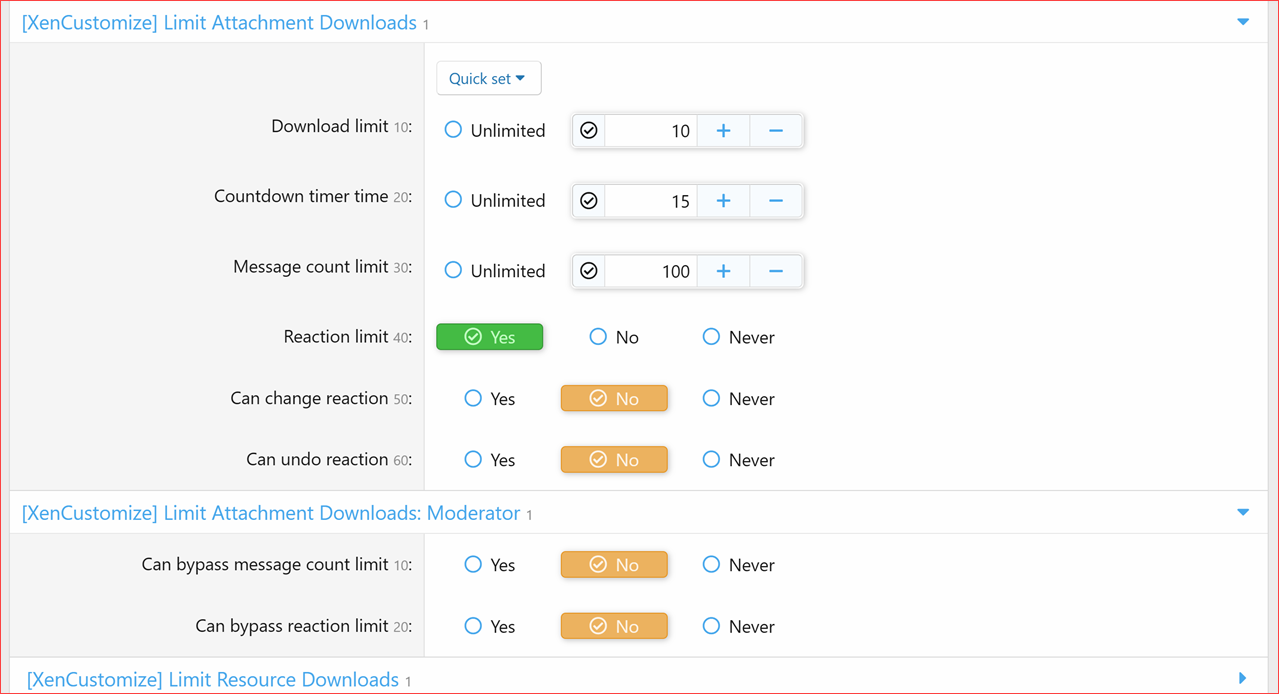
Next, explore Usergroup permissions. These 5 permissions are automatically set up during the installation process:
Please setup usergroup permissions as per your needs, specially "Download limit" and "Message count limit" should not be left as 0, see above screenshot.
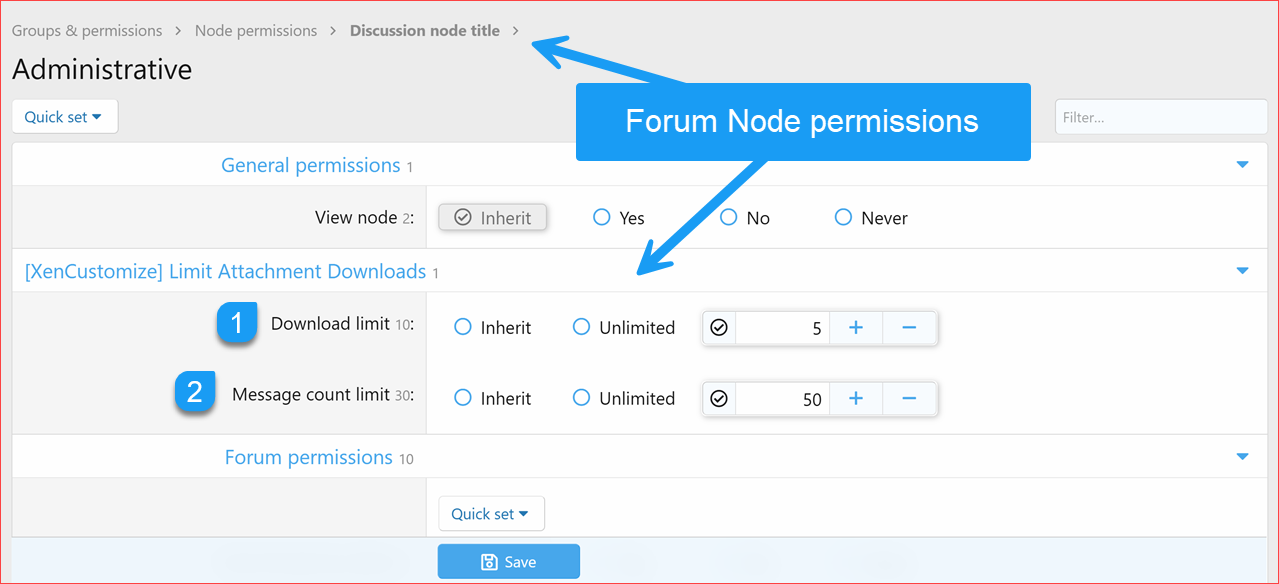
Optionally, you can also set forum node permissions.

Clicking the links in the Info Tabs Bar opens the "Download Limits Overview" page in an overlay window, as demonstrated below:

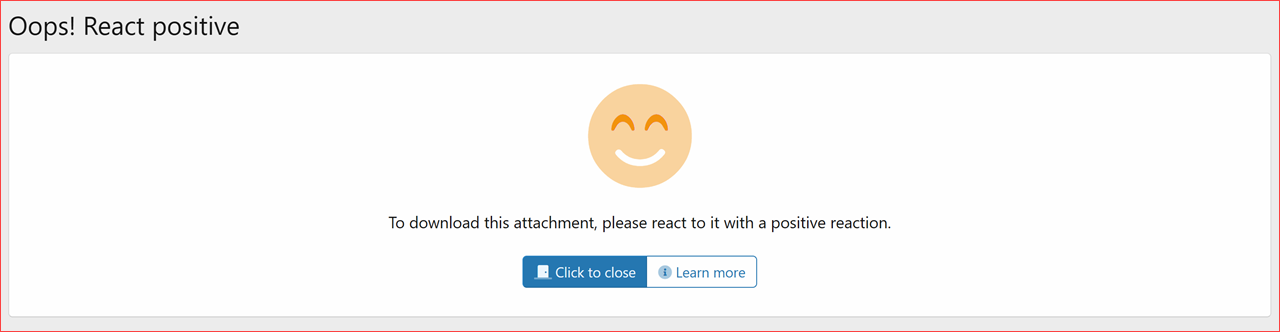
User-friendly error pages explaining and guiding users through download limits and restrictions, as shown below.
User-friendly error page to guide users when they’ve not reacted:

User-friendly error page to guide users when they’ve reacted, but not with a positive reaction:
User-friendly error page to guide users when their message count is below the minimum required:
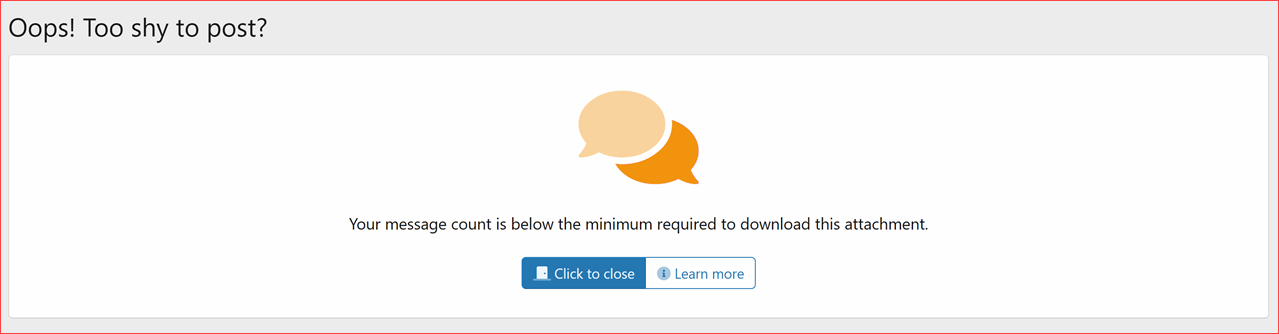
User-friendly error page to guide users when their download limit is reached:

Guest-Specific user-friendly error page for guest users attempting to download attachments:

Restrictions on changing or undoing reactions:

You can change the phrase:

You can change the phrase:
If all conditions are met, clicking the attachment will now redirect you to this new download page. To initiate the countdown timer, simply click "Get the download Link" once.
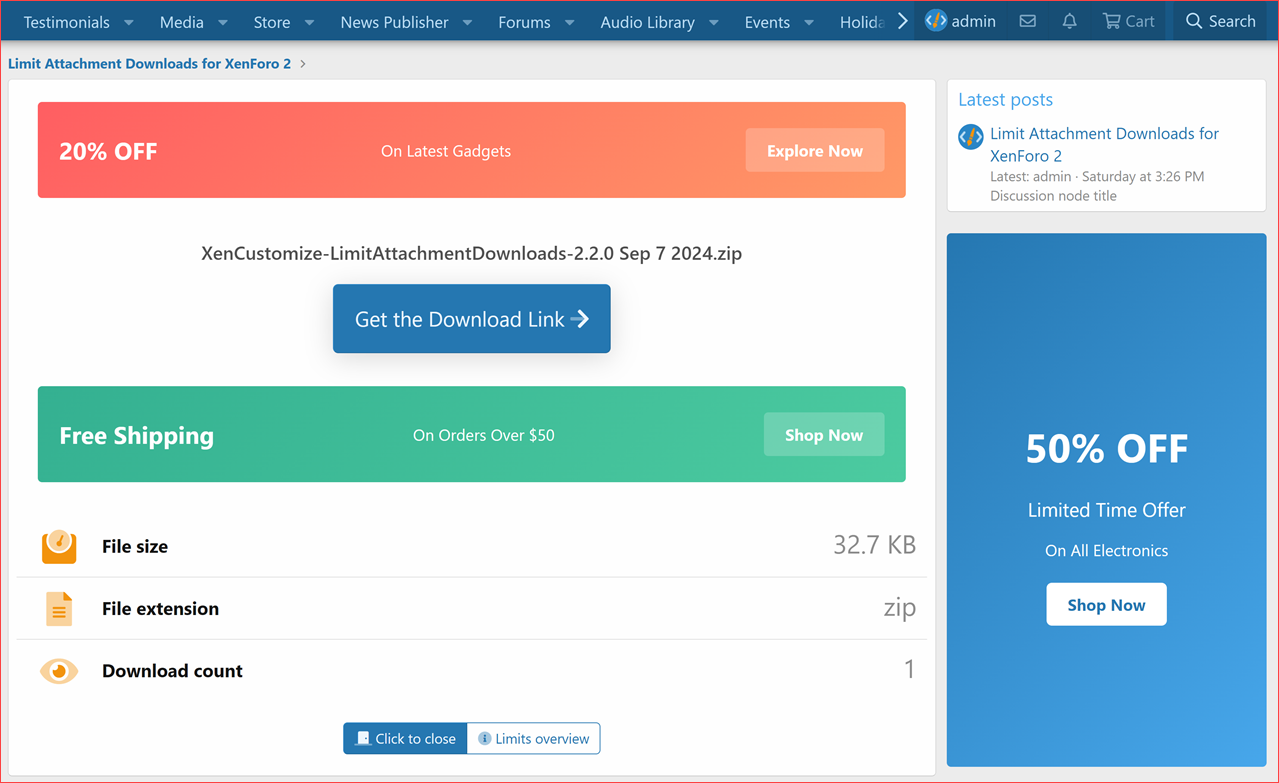
Countdown timer:

Once the countdown timer finishes, the Download button will appear:
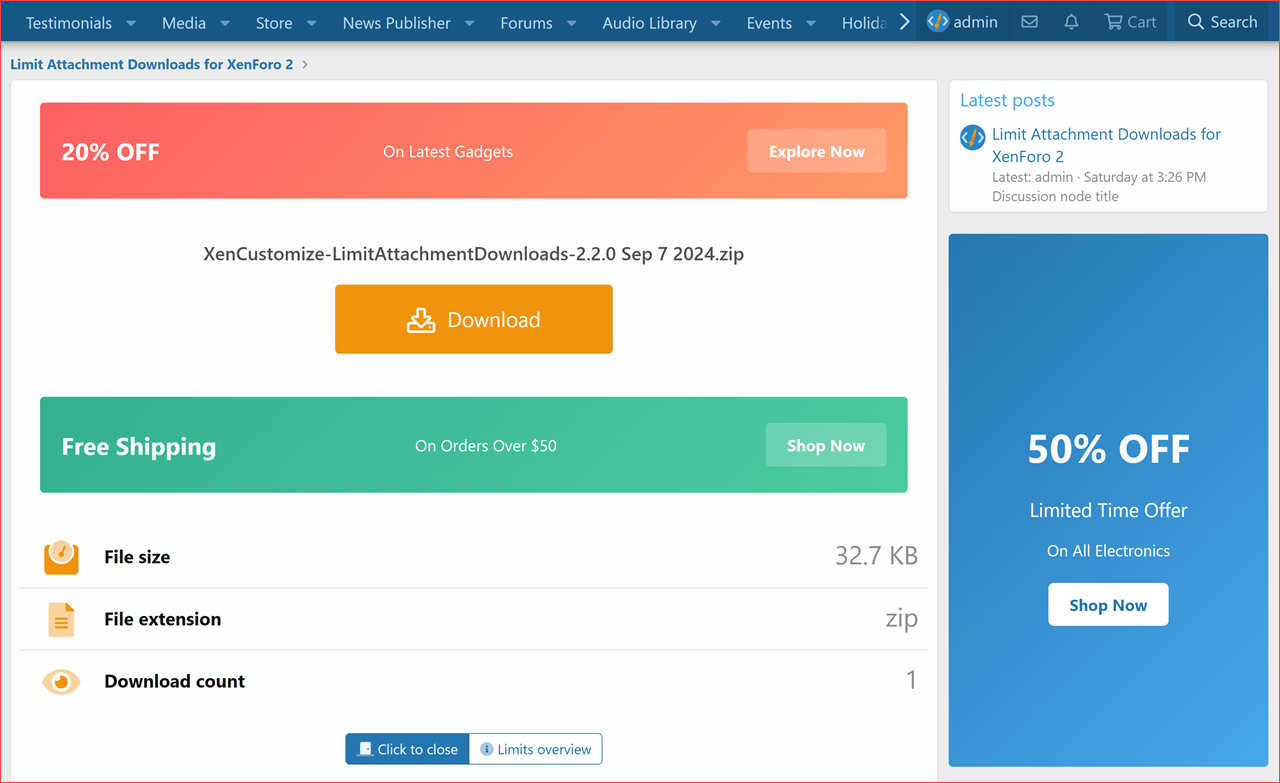
Here is a video demo:
We've included built-in advertising positions for your convenience. You can effortlessly place advertisements on the download page, either above the download button or right below it:

We've also added a sidebar widget position on the Download page. You can place ads in the right sidebar using an HTML widget.
- Daily download limits
- Positive Reaction requirement
- Minimum message count limits
In addition, the add-on can encourage user engagement on the forums and can lead to more account upgrades, boosting your site’s revenue.
 WARNING: Unauthorized Distribution & Copyright Violation
  What You Need to Know:
 Why Support the Original Developer?
Key Features
Here are some of the key features of the Limit Attachment Downloads add-on: Usergroup Permissions:Admins can fine-tune who can download attachments and under what conditions.
Support for Setting Permissions in Each Forum Node:This gives admins even more granular control over download limits.
Three Types of Limits:Admins can choose from customizable download limits, reaction limits, and message count limits.
Ability to Bypass Limits:Admins can allow users to bypass limits by setting them to “Unlimited” or by granting the appropriate usergroup permissions.
Info Tabs Bar:Provides a quick overview of the user’s current download limits for the viewed post.
Download Limits Overview Page:Offers a detailed overview of user-specific download limits for the accessed post.
User-Friendly Error Pages:These pages explain and guide users through download limits and restrictions.
Admin Options:Admins can customize the download limit reset time and enable/disable the Info Tabs Bar and Download Limits Overview Page.
Easy Customization:Includes custom classes and dedicated style properties for effortless customization.
Control Over Reactions:Restrictions on changing or undoing reactions, controlled by admin options and usergroup permissions.
File Extensions Affected by Download Limits:Admins can choose specific file extensions that will have download limits applied.
If you’re looking for a powerful way to control attachment downloads on your XenForo forum, the Limit Attachment Downloads add-on by XenCustomize is a great option. It’s packed with advance features and gives admins the flexibility to fine-tune download limits to meet their specific needs.
Complete features list
- Usergroup Permissions for Download Limits
- Added up to 8 usergroup permissions for configuring download limits and bypass options.
- Download limit
- Countdown timer time
- Message count limit
- Can bypass message count limit
- Reaction limit
- Can bypass reaction limit
- Can change reaction
- Can undo reaction
- Implemented support for setting permissions in each Forum node.
- Download limit
- Message count limit
- Added up to 8 usergroup permissions for configuring download limits and bypass options.
Compatible XF 2.x versions
- XenForo 2.2
- XenForo 2.3
Uncertain  about a specific feature?
If you need a functionality that isn't clearly mentioned above, please don't hesitate to contact us before making a purchase. Once you've bought and downloaded the add-on, your order can't be refunded.Screenshots, Install and Setup
Install "[XenCustomize] Limit Attachment Downloads" like any other XenForo add-on. In the admin options:- Default setting for the Countdown timer is 5 seconds, which you can adjust to your preferred duration.
- Default positive reaction IDs are: 1, 2, and 3.
Next, explore Usergroup permissions. These 5 permissions are automatically set up during the installation process:
- "Reaction Limit" permission is granted to user who can "React" on forum posts.
- "Bypass Reaction Limit" permission is granted to those who can "Bypass Flood Check".
- "Bypass Message Count Limit" permission is granted to those who can "Bypass Flood Check".
- "Can Change Reaction" permission is granted to users who can "Edit Any Post".
- "Can Undo Reaction" permission is granted to users who can "Delete Any Post".
Please setup usergroup permissions as per your needs, specially "Download limit" and "Message count limit" should not be left as 0, see above screenshot.
Optionally, you can also set forum node permissions.
Clicking the links in the Info Tabs Bar opens the "Download Limits Overview" page in an overlay window, as demonstrated below:
User-friendly error pages explaining and guiding users through download limits and restrictions, as shown below.
User-friendly error page to guide users when they’ve not reacted:
User-friendly error page to guide users when they’ve reacted, but not with a positive reaction:
User-friendly error page to guide users when their message count is below the minimum required:
User-friendly error page to guide users when their download limit is reached:
Guest-Specific user-friendly error page for guest users attempting to download attachments:
Restrictions on changing or undoing reactions:
You can change the phrase:
xcu_ladl_you_can_not_change_your_reactionYou can change the phrase:
xcu_ladl_you_can_not_undo_your_reactionIf all conditions are met, clicking the attachment will now redirect you to this new download page. To initiate the countdown timer, simply click "Get the download Link" once.
Countdown timer:
Once the countdown timer finishes, the Download button will appear:
Here is a video demo:
We've included built-in advertising positions for your convenience. You can effortlessly place advertisements on the download page, either above the download button or right below it:
We've also added a sidebar widget position on the Download page. You can place ads in the right sidebar using an HTML widget.
Limit Attachment Downloads 2.2.0
We've posted detailed information and screenshots showcasing the full capabilities of XenCustomize Limit Attachment Downloads 2.2.0, so visit these threads:- Reaction Restrictions
- Usergroup Permissions
- Forum Node Permissions
- Download Limits
- Bypass Limits
- Info Tabs Bar for Download Limits
- Download Limits Overview Page
- User-Friendly Error Pages for Download Limits
- Admin Options
- Attachment Download Page
- Download Countdown Timer
- Pause Countdown Timer on Tab Switch
- Default Countdown Timer Duration
- Countdown Timer Time per Usergroup
- Built-in Advertising Positions
- Sidebar Widget Position
- Style Properties